
Running Program to Go from the Couch to 5 Km in 9 Weeks (C25K)
Couch to 5K Plan PDF
The couch to 5k plan is also available below as a PDF, an image, and a Word file. I did the C25K running program about 10 years ago. I went from a couch potato to 5K and then eventually went on to a full marathon and a few halves on the way. When I started I could barely run for 1 minute! It’s a great running program for beginners.
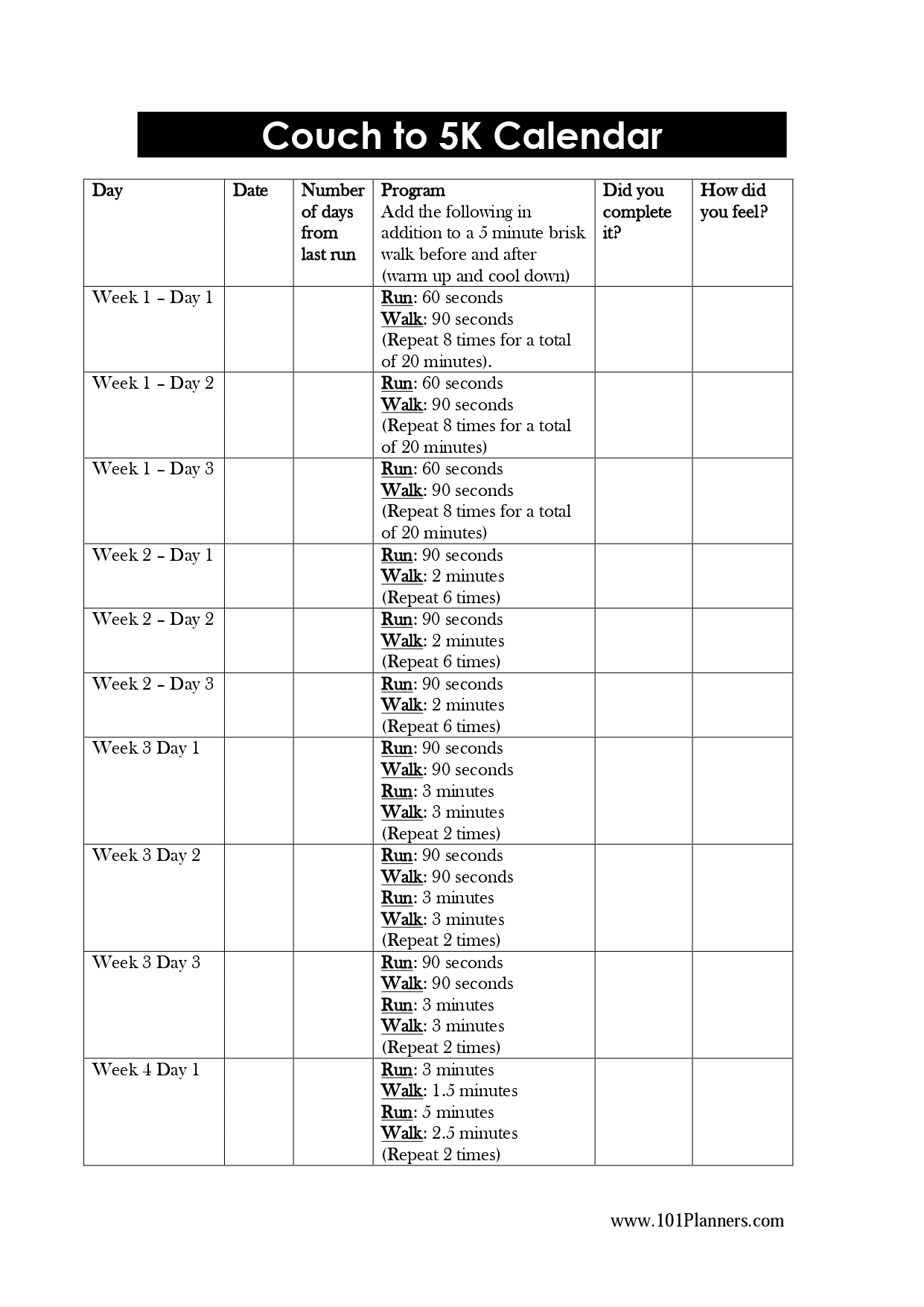
PDF | Word | For image files, click on the images above.
The couch to 5K schedule lists how long you need to run each day, whether or not you completed it, and how you felt. It also has a section to write how long it was since the last run, which will help you understand if a run was difficult, etc.
I went from a couch potato to running a 5K, and eventually a full marathon with a few half marathons along the way. When I started, I could barely run for one minute. Couch to 5K is the program that got me there, and it can do the same for you. This plan is completely free: you can build a personalized version with the tool above (which also gives you a printable PDF and a calendar file you can add to your phone), or download the ready-made plan as a PDF, a Word document, or an image. The built-in interval timer then guides every run, so you always know when to run and when to walk.
What is the Couch to 5K program?
Couch to 5K, often shortened to C25K, is a nine-week running plan that takes you from the couch to running for 30 minutes without stopping. If you run fast enough, 30 minutes will cover a full 5K (3.1 miles), but not everyone manages that at first, and that is completely fine. Going from sitting on the couch to running 30 minutes straight is the real win. Your speed improves on its own over time. I never thought I would run, or could run, and the program proved me wrong.
How does it work?
The plan is built on intervals: you alternate between running and walking, and as your fitness improves, the running stretches get longer while the walking breaks get shorter. Every workout starts with a five-minute brisk-walk warm-up and ends with a five-minute cool-down walk, with the run and recovery intervals in between. The increases are gradual and manageable, which is exactly why it works for people who have never run before.
Your week-by-week Couch to 5K schedule
Here is the standard nine-week structure the tool uses. Each line is one workout, done three times that week with a rest day in between:
- Week 1: run 1 minute, walk 90 seconds, repeated 8 times.
- Week 2: run 90 seconds, walk 2 minutes, repeated 6 times.
- Week 3: two rounds of run 90 seconds, walk 90 seconds, run 3 minutes, walk 3 minutes.
- Week 4: run 3 minutes, walk 90 seconds, run 5 minutes, walk 2.5 minutes, then repeat the 3-minute and 5-minute runs.
- Week 5: the runs get longer each session, finishing with your first 20 minutes of nonstop running.
- Week 6: a mix of 5-, 8-, and 10-minute runs, finishing with 25 minutes nonstop.
- Week 7: 25 minutes of running, three times.
- Week 8: 28 minutes of running, three times.
- Week 9: 30 minutes of running, which for most people is right around a full 5K.
The biggest mental hurdle is Week 5, Day 3, when you run 20 minutes without stopping for the first time. I obsessed over that workout. I spent hours searching for tips on how to get through it and never believed it was possible. It was. My neighbor and I made it, and you will too. By the time you reach it, your body has already done the work to be ready, so trust the plan and keep your pace easy.
How to use the free printable plan
Build your plan with the tool above and click Download PDF, and you will get a clean, printable copy with every run dated, the workout for each day, and a tick box to check off as you go. You can also use the ready-made PDF, Word, and image versions. The schedule lists how long you need to run each day, whether you completed it, and how you felt, plus how long it had been since your last run, which helps you understand why a particular run felt hard or easy. I loved marking off each run. It made me feel like I was actually getting somewhere.
Check off your runs and pick up right where you left off
One of my favorite parts of the whole program is checking off a run. The moment you finish, you tap the circle next to that day and it crosses itself out, the progress bar slides forward, and another run is in the bank. I love seeing the runs I have already done crossed out behind me. It is so satisfying, and on the days when motivation is low, looking back at how much you have already finished is usually the exact push you need to get out the door again.
Even better, your plan saves itself as you go. Every run you check off is stored right here in your browser, so you can close the tab and come back tomorrow, or next week, and your plan will be exactly where you left it, with your finished runs still crossed out and your next run ready and waiting. There is nothing to log into and nothing to set up a second time. Your progress is simply here when you come back.
Because your plan lives on this page, bookmark it now so it is easy to find when it is time for your next run. Tap Save in the tool above, or press Ctrl+D on a PC or Cmd+D on a Mac, and the page is one click away whenever you need it. Then just come back, check off today’s run, watch it cross off the list, and keep going all the way to your graduation run and your first 5K.
How do you keep track of the time during a run?
I have found that when you keep looking at your watch, the time just does NOT pass. That is exactly why I built an interval timer right into this page. Tap Start timer on any run and it counts down each segment, changes color between running and walking, and beeps and vibrates when it is time to switch, while keeping your screen awake so it never goes dark mid-run. You can put your phone in your pocket and simply run when it says run and walk when it says walk. There is nothing to install and it works straight from your browser.
How far and how fast will you run?
A 5K is 5 kilometers, or 3.1 miles. The program is designed to get you running for 30 minutes, and if you run at around 10 km/hr you will cover 5K in that time. I did not run that fast during the program myself, but my speed improved a lot in the years afterward. Concentrate on the duration and let the speed come later. If 30 minutes is a little short of a full 5K at first, you can always add a few minutes to your final runs to close the gap.
What if you can already run a bit?
You do not have to start at Week 1. When you build your plan, pick the option that matches what you can already do, and the tool will start you at the right point in the program. If you can already run 5 to 10 minutes, you will begin partway through; if you can run 20 to 25 minutes, you will get a short plan that locks in a full 5K in a couple of weeks. That makes this useful whether you are starting from scratch or coming back after a break.
Can you do Couch to 5K on a treadmill?
Yes, and it works exactly the same. If you run on a treadmill, set the incline to about 1% to replicate the natural resistance you get running outside. Use the timer to manage your run and walk intervals, run at an easy pace, and drop to a comfortable walking speed for the recovery breaks. A treadmill is great when it is too hot or too cold to run outdoors. I personally find it easier to run outside, but the treadmill is a perfectly good option, especially with a good movie on.
Do you lose weight doing Couch to 5K?
I am not an expert, but I can share my own experience. I started the program hoping to lose weight, and while I did not lose a huge amount from the running alone, I felt great. In the beginning I was careful about what I ate and the weight did come off. Later, as I started eating more, I gained weight even though I was running more. A 5K run burns roughly 300 calories, so running three times a week works out to about half a kilo, or a pound, a month, which is not much on its own. If weight loss is your goal, what you eat matters more than the running. There is a reason people say it is 80% nutrition and 20% exercise.
Is Couch to 5K 8 weeks or 9 weeks?
You will see the program described as both, which causes a lot of confusion. The original and most widely followed version is nine weeks of three runs each. Some shorter eight-week versions exist for people who already have a little running base, and the tool above effectively gives you a shorter plan automatically when you tell it you can already run for a few minutes. If you are a true beginner, stick with the full nine weeks. The extra week is where a lot of the lasting fitness comes from.
Tips to finish your first 5K
Keep your running pace slow enough that you could hold a conversation. Beginners almost always start too fast. Take your rest days seriously, because that is when your body adapts and gets stronger, and do not skip the warm-up and cool-down walks. I stuck to the program most days, but I did repeat some days when I could not hit the target times, and that is completely fine. I also did the program with my neighbor, and I think having a running partner makes a real difference. If life gets in the way and you fall behind, use the Reschedule from today button so your remaining runs line up with your real calendar again instead of feeling like you have failed.
A running plan is really just a goal broken into small, scheduled steps, which is how any big goal gets done. If this approach works for you, our free goal planner can help you map out other goals the same way. Lace up, start with run one, and let the plan carry you to your first 5K.
Couch to 5K on a Treadmill
Yes, you can do the entire Couch to 5K program on a treadmill, and the plan is exactly the same as it is outdoors. You follow the same nine weeks of run-walk intervals, the same five-minute warm-up and cool-down walks, and the same gradual build toward 30 minutes of nonstop running. A treadmill is a great option when it is too hot or too cold to run outside, and it lets you hold a steady, controlled pace while you are still learning. I had walked on a treadmill on and off for years before I ever ran a step outdoors, so for a lot of people the treadmill is the most comfortable place to start.
Can you do Couch to 5K on a treadmill for beginners?
Absolutely. If anything, the treadmill makes the early weeks easier to manage, because the machine sets your pace for you and you do not have to think about it. Build your plan with the tool above, set your run and walk speeds, and let the built-in timer tell you when to switch. You run when it says run and walk when it says walk, with nothing to install and nothing to calculate mid-workout.
What speed should you set on the treadmill?
There is no single correct speed, because it depends on your fitness, but a good starting point is a walking speed of around 3 to 3.5 mph for the recovery breaks and an easy jog of around 4 to 5 mph for the running intervals. The goal is an effort you could just about hold a short conversation at, not a sprint. Beginners almost always start too fast, so if in doubt, go slower. As you get fitter over the nine weeks you can nudge the running speed up, but the plan works at whatever easy pace feels sustainable for you.
What incline should you use?
Set the treadmill to a 1% incline. Running on a flat belt is slightly easier than running outdoors because there is no air resistance and the belt helps pull your legs through, so a small 1% incline replicates the natural effort of running outside. It also makes the eventual move to outdoor running feel far less of a jump. There is no need to go higher than that during the program.
How to follow the Couch to 5K treadmill plan
The treadmill plan follows the same structure as the standard program: a five-minute brisk-walk warm-up, the run and walk intervals for that day, then a five-minute cool-down walk. Use the timer on this page to manage every interval, and use the speed and incline guidance above to set the machine. Each week the running stretches get longer and the walking breaks get shorter, exactly as they do outside, until you are running for 30 minutes straight.
Treadmill or outside: which is better for Couch to 5K?
Both work, and the plan is identical either way, so it really comes down to what you will actually stick with. A treadmill gives you a cushioned, climate-controlled, perfectly steady pace, and it is ideal in bad weather. Running outside builds a little extra strength from varied terrain and wind, and many people find it more enjoyable once they have some fitness. I personally prefer running on the treadmill with a good movie on, but I do find it easier to run outside, and plenty of people mix the two. If you train mostly indoors, keep that 1% incline so switching to the pavement later feels natural.
Frequently asked questions
How long does the Couch to 5K plan take?
The standard plan is nine weeks, with three runs per week and a rest day between each. If you can already run for a few minutes, the plan above will be shorter because it starts you further along.
How many days a week should I run?
Three is the classic rhythm and the one most beginners can sustain. Two days a week is gentler and stretches the calendar out a little; four moves faster but only works well if you recover between runs. The tool lets you pick, and it dates your plan accordingly.
What if I miss a week or fall behind?
That is normal and not a problem. Use the Reschedule from today button to slide every run you have not finished forward so your plan starts again from today. You can also repeat any week that felt too hard before moving on.
I can already run a few minutes. Where do I start?
Choose the level that matches your current fitness when you build your plan, and you will begin at the appropriate week instead of Week 1. Existing runners often start around Week 4 to 6.
How far is a 5K?
A 5K is 5 kilometers, or 3.1 miles. At a gentle beginner pace, running for 30 minutes nonstop covers roughly that distance, which is why the plan finishes with 30-minute runs.
Do I need to download an app?
No. The plan, the printable PDF, the calendar export, and the interval timer all run right here in your browser, on your phone or computer, with nothing to install.


My name is